Tuesday, June 28, 2011

Creating phonecall


The main issue you will face in this case is assigning 'to' value to phonecall.

1. For 4.0

//first create the activityparty type object like
activityparty toActivity = new activityparty();
//Then assign partyid
toActivity.partyid = new Lookup("contact", contactID);
//Assign that activitypartyobject to 'to' of phone call.
phncall.to = new activityparty[] { toActivity };
service.Create(phncall);


2. For 2011

Guid contactID = new Guid("A11111F7-208C-E011-B5F4-000C29FABFAC");
PhoneCall phncall = new PhoneCall();
//first create the activityparty type object like
ActivityParty toActivity = new ActivityParty();
//Then assign partyid
toActivity.PartyId = new EntityReference("contact", contactID);
//Assign that activitypartyobject to 'to' of phone call.
phncall.To = new ActivityParty[] { toActivity };
service.Create(phncall);


It will work.
If any issue just let me know.
thanks

Host file location

you can find the host file at this location :

C:\Windows\System32\drivers\etc

Otherwise you can type drivers in run and will get the host file.


Use of host file is to access the crm outside the local machine.

Creating Wrapper class in Crm2011

I have tried it for 2011 but you can try it for 4.0 also.

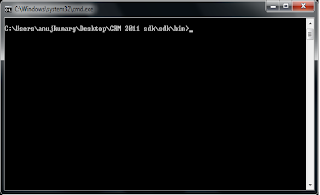
1. Download the sdk and go to the bin folder using command prompt.

2.You will see one svcutil.exe

3.In command prompt you will reach the bin folder like this


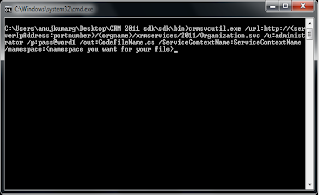
4.Then you need to type this command with respect to your requirement and parameters and you will get the output file in your bin folder. if any issues just let me know

Command: crmsvcutil.exe /url:http://servername:portnumber/orgname/xrmservices/2011/Organization.svc /u:administrator /p:pass@word1 /out:CodefileName.cs /ServiceContextName:ServiceContext /namespace:

Wednesday, October 13, 2010

Cancelling Unsuccessful Workflows through Coding

Just Call thsi method by Passing..1 WorkflowName.2.Guid id of the Entity at which its Fired.3.crmserviceObject
eg:
KillWorkflow("SynchLyrisToCrmAnuj", new Guid("7DAA4DD0-70AC-DF11-9575-40618664DD9A"), service);

Method:

public static void KillWorkflow(string workflowName, Guid entityId, CrmHelper service)
{
string error = "";

//CrmService service = Utils.GetCrm4Service(null, false);

ColumnSet colsWf = new ColumnSet(new string[] { "name", "statuscode", "asyncoperationid", "regardingobjectid" });


ConditionExpression conditionName = new ConditionExpression();
conditionName.AttributeName = "name";
conditionName.Values = new string[] { workflowName };

ConditionExpression conditionRegardingObjectId = new ConditionExpression();
conditionRegardingObjectId.AttributeName = "regardingobjectid";
conditionRegardingObjectId.Values = new string[] { entityId.ToString() };

FilterExpression filter = new FilterExpression();
filter.AddCondition(conditionName);
filter.AddCondition(conditionRegardingObjectId);
filter.FilterOperator = LogicalOperator.And;

QueryExpression query = new QueryExpression();
query.ColumnSet = colsWf;
query.EntityName = EntityName.asyncoperation.ToString();
query.Criteria = filter;

BusinessEntityCollection results = service.RetrieveMultiple(query);

if (results.BusinessEntities.Count > 0)
{
for (int i = 0; i < results.BusinessEntities.Count; i++)
{
asyncoperation singleWorkflowInstance = (asyncoperation)results.BusinessEntities[i];
if (singleWorkflowInstance.statuscode.Value == AsyncOperationStatus.WaitingForResources ||
singleWorkflowInstance.statuscode.Value == AsyncOperationStatus.Waiting ||
singleWorkflowInstance.statuscode.Value == AsyncOperationStatus.Pausing ||
singleWorkflowInstance.statuscode.Value == AsyncOperationStatus.InProgress)
{
try
{
Status statusCanceled = new Status();
statusCanceled.Value = AsyncOperationStatus.Canceled;

AsyncOperationStateInfo state = new AsyncOperationStateInfo();
state.Value = AsyncOperationState.Completed;

SetStateWorkflowRequest request = new SetStateWorkflowRequest();
singleWorkflowInstance.statuscode = statusCanceled;
singleWorkflowInstance.statecode = state;

TargetUpdateAsyncOperation operation = new TargetUpdateAsyncOperation();
operation.AsyncOperation = singleWorkflowInstance;

UpdateRequest update = new UpdateRequest();
update.Target = operation;
UpdateResponse updated = (UpdateResponse)service.Execute(update);
}
catch (System.Web.Services.Protocols.SoapException ex)
{
error = "KillWorkflow Error " + ex.Message + "" + ex.StackTrace;
}
catch (Exception ex)
{
error = "KillWorkflow Error " + ex.Message + "" + ex.StackTrace;
}
}
}

if (error != null && !error.Equals(""))
{
throw new Exception(error);
}
}
}

Its working fine..........cheers.!!

Tuesday, October 5, 2010

Service of CRM 5.0

To make this happen ....you will have to add two .cs files from the crm2011's sdk
1. crmservicehelpers.cs
2.myorganizationcrmsdktypes.cs


ClientCredentials creds = new ClientCredentials();
creds.Windows.ClientCredential = new System.Net.NetworkCredential("administrator", "password", "domain");

OrganizationServiceProxy _service = new OrganizationServiceProxy(
new Uri("http://crm2011:5555/crm2011/XRMServices/2011/Organization.svc"),
null,
creds,
null);
//
_service.ServiceConfiguration.CurrentServiceEndpoint.Behaviors.Add(new ProxyTypesBehavior());

OrganizationServiceContext orgContext =
new OrganizationServiceContext(_service);

Getting/Creating Accounts/Contacts in crm2011/crm5.0

Creating Contact...........


Contact primaryContact = new Contact()
{
FirstName = "Anuj",
LastName = "Govil",
JobTitle = "Software Programmer"
};
orgContext.AddObject(primaryContact);
orgContext.SaveChanges();


Getting Accounts.....

var accounts = (from acc in orgContext.CreateQuery()
where acc.Name.StartsWith("s")
select new Account()
{
Name = acc.Name,
AccountId = acc.AccountId
}).ToList();

foreach (var acc in accounts)
{
Console.WriteLine(acc.Name);
acc.PrimaryContactId = new EntityReference(primaryContact.LogicalName, primaryContact.Id);
orgContext.UpdateObject(acc);
}
orgContext.SaveChanges();

Monday, October 4, 2010

How to Hide the Views in CRM 4.0 using plugin

This will work for an Account.............It will hide the inactive accounts from the view.
Same code will work for Contacts if you replace otc1=2 & Inactive Accounts to Inactive Contacts.

Code:--------------------------------
int otc1 = 1;
//StringCollection sc1 = new StringCollection();
//sc1.Add("Inactive Accounts");
//_hideViews.Add(otc1, sc1);
if (!(context.MessageName == MessageName.RetrieveMultiple && context.PrimaryEntityName == EntityName.savedquery.ToString() && context.InputParameters.Contains(ParameterName.Query) && context.OutputParameters.Contains(ParameterName.BusinessEntityCollection)))
return;

QueryExpression qe = context.InputParameters[ParameterName.Query] as QueryExpression;
if (qe == null) // Check it's a QueryExpression
return;
ConditionExpression cond = GetCondition(qe.Criteria, "returnedtypecode");
if (!(cond != null && cond.Operator == ConditionOperator.Equal && cond.Values.Length == 1 && cond.Values[0] is int)) // Check there is an equiality condition on returnedtypecode for an integer value
return;
int otc = (int)cond.Values[0];
if (otc1 != otc) // Check that we want to exclude views for this entity
return;
BusinessEntityCollection becViews = (BusinessEntityCollection)context.OutputParameters[ParameterName.BusinessEntityCollection];
if (!(becViews != null && becViews.EntityName == EntityName.savedquery.ToString())) // Check there are some views, and they are the right type
return;
//StringCollection scHide = _hideViews[otc];
for (int i = becViews.BusinessEntities.Count - 1; i >= 0; i--) // Iterate backwards, as items may be removed
{
DynamicEntity de = (DynamicEntity)becViews.BusinessEntities[i]; // BusinessEntityCollection is of type DynamicEntity
if (de.Properties.Contains("name") && (string)de.Properties["name"] == "Inactive Accounts") // Hide this view - i.e. remove it from the collection of returned views
becViews.BusinessEntities.RemoveAt(i);
}